
TelecareTraining Logo
Sign up
Professional telecare simulator

Train telecare operators with real calls

Much more than a simulator. The online platform for teaching telecare, designed so that training centres and companies can train telecare professionals in a practical, realistic and effective way.

  • Live 3-way calls
  • Real-time assessment
  • Up to 25 students

Live 3-way calls

Simulate real conversations between two students and a teacher, with real-time assessment

Real-time assessment

The teacher supervises and assesses every simulation in real time

Realistic simulations

Train students with situations inspired by the daily work of a professional telecare service

Built-in exams

Assess the knowledge acquired with practical and theory tests directly from the platform

Up to 25 students per licence

Manage whole groups from a single licence, making it easy to organise and track learning

+0 YEARS Constantly evolving technology
0% ONLINE No downloads or installation
+
+0 STUDENTS Trained on the platform
NOW--:--:--
24/7 AVAILABLE Full access, any time

Flexible access from anywhere

No local servers needed. An interface designed so students and teachers can manage calls, diaries and reports from any browser, computer, tablet or mobile device.

Everything synced in real time

The platform training centres need to train telecare professionals

Realistic simulations, continuous assessment, student management, exams, calls and follow-up, all in one professional platform

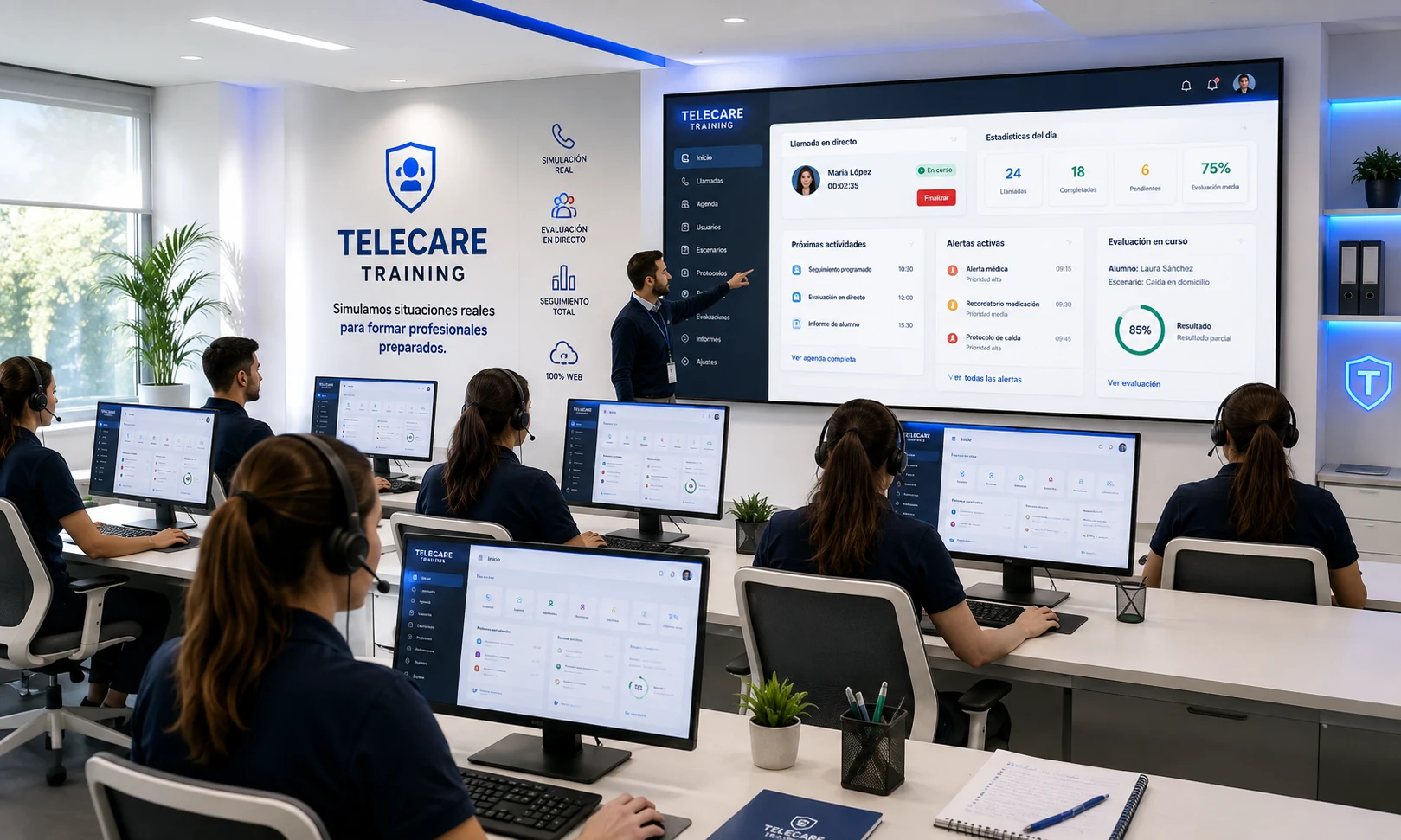
Training classroom with Telecare Training: students with headsets and a teacher supervising on a big screen
CALLS IN PROGRESS6 in the classroom
85%
LIVE ASSESSMENTLaura SánchezFall at home

Press the button. That's how every call begins.

When a user presses their telecare pendant, the call reaches the call centre. With Telecare Training your students experience that moment just like in a real service.

  1. 01The user presses their pendant
  2. 02The call reaches the call centre
  3. 03The student answers and the teacher assesses
Press the pendant
or
Call centre09:41
Standing by No incoming calls
INCOMING CALL
C
Carmen Ruiz, 82 Alarm button pressed
  • 12 Calle Mayor, 2nd B
  • Lives alone · Hypertension
Answer
C
Carmen Ruiz00:00
Assessing
✓ Call logged · Grade 9,2

How does the simulation work in the classroom?

From the simulated call to the final report, the whole process is logged and assessed by the teacher

Receive the call

The student receives a simulated call based on a real telecare case

Takes the call

Listen, identify the situation and respond with the right protocol

Apply the protocol

Follow the established protocols and make decisions during the simulation

Handle the incident

Log the action, activate resources and resolve the incident

Log the action

Document the intervention and schedule the necessary follow-ups

Teacher assessment

The teacher supervises, comments on and assesses every performance in real time

Final report

The platform builds a complete history to measure student progress

Your students, on the other end of the line

This is how your students feel on Telecare Training: headset on, handling real telecare calls while the teacher listens.

Teacher listening
Role: operator
Incoming call · EmergencyMaría, 84 · Button pressed
Tap to answer

Five tools. One classroom.

01 / 05

The most realistic learning experience

Students practise real calls with classmates following telecare protocols, while the teacher can step in and assess live.

Your students talk.
You join in.

Join any live call without interrupting it.

Three modules. The whole certificate.

The three modules of the official telecare call-handling certificate, ready to examine. Theory, practice and automatic marking on the same platform.

  1. 01
    MODULE 1Handling and managing incoming calls
  2. 02
    MODULE 2Making and managing outgoing calls
  3. 03
    MODULE 3Tools, techniques and skills of the service
QUESTION 07 / 20The user presses the button but doesn't answer. What do you do first?
AEnd the call
BApply the no-response protocol
CWait for them to call again
GRADE9.4 · PASS
MODULE 101Handling and managing incoming calls
  • Theory and practice
  • Call simulation
  • Automatic marking
EXAM · MODULE 1Handling and managing incoming calls20 questions
Theory and practice
Automatic marking
OFFICIAL CERTIFICATE · TELECARE TRAINING
QUESTION 07 / 20After a hospital discharge, when do you make the follow-up call?
AWithin the first 24–48 hours
BThe following month
COnly if the user asks
GRADE9.4 · PASS
MODULE 202Making and managing outgoing calls
  • Theory and practice
  • Outgoing calls
  • Automatic marking
EXAM · MODULE 2Making and managing outgoing calls20 questions
Theory and practice
Automatic marking
OFFICIAL CERTIFICATE · TELECARE TRAINING
QUESTION 07 / 20A user is very anxious. Which technique do you use?
ATalk faster
BTransfer the call
CActive listening and a calm tone
GRADE9.4 · PASS
MODULE 303Tools, techniques and skills of the service
  • Theory and practice
  • Operator skills
  • Automatic marking
EXAM · MODULE 3Tools, techniques and skills of the service20 questions
Theory and practice
Automatic marking
OFFICIAL CERTIFICATE · TELECARE TRAINING
Tap a book to open it

How it used to be taught. How it's taught now.

Tap a card to flip it

Try the platform in 4 steps.

Fully automated: no need to email us. Your free 48-hour demo is created instantly.

  1. 01

    Sign up

    Create your centre's account in under a minute. Go to sign-up

  2. 02

    Go to the Client Area

    Log in with your username and password. Go to the Client Area

  3. 03

    Request the demo

    Click “Request free demo” in your Client Area. It's created instantly.

  4. 04

    Try it in your classroom

    For 48 hours, with 1 teacher and 3 students: call simulator, diary, notes and statistics.

SIGN UP AND TRY IT

Tailored to your centre.

Public school Training centre
ESSENTIAL3 months
14students
+ 1 teacher

The essentials to launch your first course

  • 100% web-based
  • Call handling
  • Diary and notes
  • Automated sign-up
  • Protected data
  • Multiple-choice exams
  • Practical exams
  • Advanced statistics
  • 3-way call (students + teacher)
*SIGN UP
PRO6 months
19students
+ 1 teacher

With exams and statistics

  • 100% web-based
  • Call handling
  • Diary and notes
  • Automated sign-up
  • Protected data
  • Multiple-choice exams
  • Advanced statistics
  • Practical exams
  • 3-way call (students + teacher)
*SIGN UP
PREMIUM12 months
24students
+ 1 teacher

Full course, no limits, 3-way calls

  • 100% web-based
  • Call handling
  • Diary and notes
  • Automated sign-up
  • Protected data
  • Multiple-choice exams
  • Practical exams
  • Advanced statistics
  • 3-way call (students + teacher)
*SIGN UP

*Sign up for free to see prices and buy licences for your centre

Where do I log in?

Telecare Training has two separate areas, each with its own login and purpose.

Discover a new way to teach telecare

A platform designed to deliver a more practical, more realistic and more effective learning experience, with professional simulations, real-time assessment and complete student tracking

REQUEST FREE DEMO
Telecare TrainingNew · now

New module: exams

Create, schedule and automatically mark exams from the platform.

Simulated emergencyCould you handle it? Try it